
Does polling rate affect sensitivity? Learn how mouse polling rate changes input feel, DPI response, eDPI, cm/360, and gaming aim consistency.
Polling rate does not directly change your mouse sensitivity. Your sensitivity is mainly controlled by DPI, in game sensitivity, Windows pointer settings, and game input settings. Polling rate controls how often your mouse reports movement to your computer.
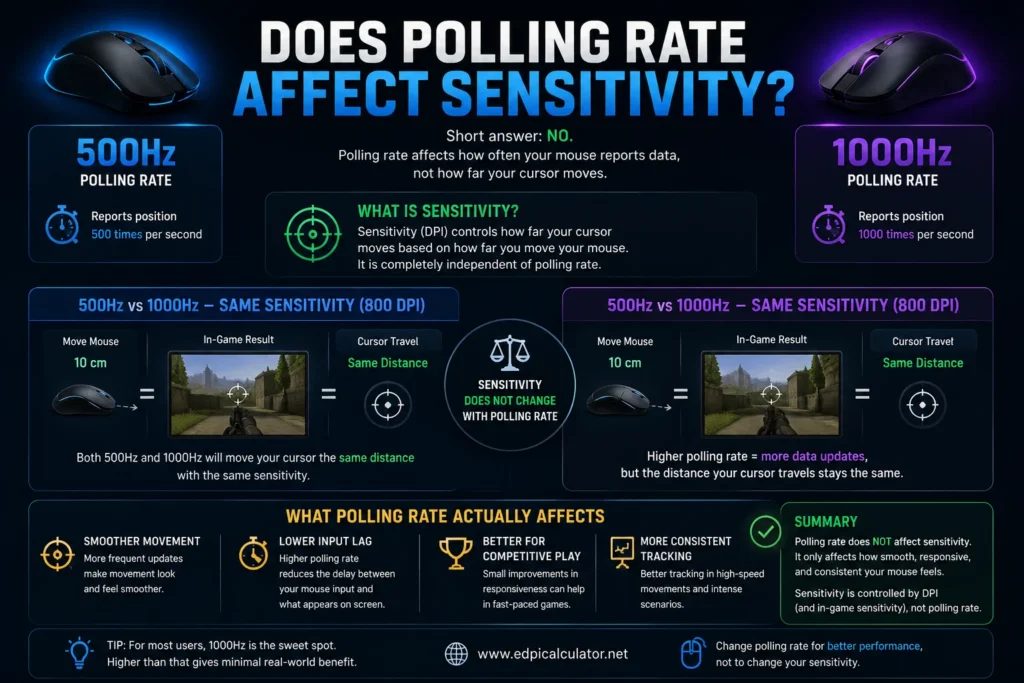
That said, polling rate can change how your sensitivity feels. A mouse set to 1000Hz may feel smoother, faster, or more responsive than the same mouse at 500Hz, even when DPI and in game sensitivity stay the same. The distance needed to turn 360 degrees should not change, but the timing and smoothness of the movement can feel different. for More information Mouse Polling Rate Checker
What Is Mouse Polling Rate?
Mouse polling rate is how many times per second your mouse sends movement and click data to your computer. It is measured in Hertz, written as Hz.
Common polling rates
- 125Hz sends data every 8 milliseconds
- 250Hz sends data every 4 milliseconds
- 500Hz sends data every 2 milliseconds
- 1000Hz sends data every 1 millisecond
- 2000Hz sends data every 0.5 milliseconds
- 4000Hz sends data every 0.25 milliseconds
- 8000Hz sends data every 0.125 milliseconds
A higher polling rate means your PC receives mouse updates more often. This can reduce input delay and make movement feel more connected.
What Is Mouse Sensitivity?
Mouse sensitivity is how far your cursor or crosshair moves when you move your mouse. It is usually controlled by DPI and software sensitivity.
Sensitivity depends on:
- Mouse DPI
- In game sensitivity
- Windows pointer speed
- Mouse acceleration
- Raw input settings
- Game engine input behavior
- FOV and zoom level in some games
For games, players often use eDPI to compare sensitivity.
eDPI = mouse DPI × in game sensitivity
Polling rate is not part of that formula.
Does Polling Rate Directly Affect Sensitivity?
No. Polling rate should not directly change your sensitivity value. If your DPI is 800 and your game sensitivity is 1.0, your eDPI is still 800 whether your mouse is set to 500Hz, 1000Hz, 2000Hz, or 4000Hz.
Example
- 800 DPI × 1.0 sensitivity at 500Hz = 800 eDPI
- 800 DPI × 1.0 sensitivity at 1000Hz = 800 eDPI
- 800 DPI × 1.0 sensitivity at 4000Hz = 800 eDPI
The mathematical sensitivity stays the same. What changes is how often the mouse sends movement data.
Why Polling Rate Can Feel Like It Changes Sensitivity
Many players say their sensitivity feels different after changing polling rate. This can happen even when the real turn distance stays the same.
Polling rate can change the feel because of:
- Lower input delay
- Smoother cursor updates
- Different motion timing
- Game engine input handling
- Mouse smoothing behavior
- CPU load changes
- Wireless stability
- Frame rate and monitor refresh rate
So the correct answer is this: polling rate does not change sensitivity directly, but it can change perceived sensitivity.
500Hz vs 1000Hz Sensitivity Feel
500Hz and 1000Hz are the most common polling rates for gaming mice. The difference is small but noticeable for some players.
500Hz
- Reports every 2 milliseconds
- Can feel stable on older systems
- Uses slightly less CPU
- Can save wireless battery
- May feel slightly less responsive than 1000Hz
1000Hz
- Reports every 1 millisecond
- Usually better for competitive gaming
- Can feel smoother and more direct
- Works well with high refresh monitors
- May use more CPU and battery than 500Hz
If 1000Hz feels faster, it is usually because the movement is updating sooner and more often, not because your DPI changed.
Does Higher Polling Rate Make Sensitivity Faster?
Higher polling rate should not make your actual sensitivity faster. Moving your mouse the same distance should still produce the same in game turn distance.
But higher polling rate may make the mouse feel faster because the screen responds sooner. This sharper response can feel like increased sensitivity, especially if you are used to a slower or less stable polling rate.
It may feel faster when:
- You move from 125Hz to 1000Hz
- You play on a high refresh monitor
- Your game handles raw input well
- Your frame rate is stable
- Your old polling rate had inconsistent timing
Does Lower Polling Rate Make Sensitivity Slower?
Lower polling rate can feel slower or heavier because updates arrive less often. At 125Hz, your mouse reports every 8 milliseconds. At 1000Hz, it reports every 1 millisecond.
The crosshair may still travel the same distance, but the motion can look less smooth and feel less immediate.
Lower polling rate may feel like:
- Heavier aim
- Delayed cursor movement
- Less smooth tracking
- Floaty crosshair response
- Less precise micro adjustment
Polling Rate vs DPI
DPI and polling rate are different settings.
DPI controls movement amount
DPI tells your mouse how many counts to send for each inch of physical movement. Higher DPI usually means the cursor moves farther for the same hand movement, unless you lower sensitivity to match.
Polling rate controls update frequency
Polling rate tells your mouse how often to send those counts to the computer. Higher polling rate means more frequent reports.
Simple difference
- DPI changes how much movement is sent
- Polling rate changes how often movement is sent
- In game sensitivity multiplies mouse movement
- Raw input can make movement more consistent in games
Polling Rate vs eDPI
eDPI is a sensitivity number. Polling rate is a timing number.
eDPI = DPI × in game sensitivity
Polling rate does not appear in the eDPI formula.
Example
- 400 DPI × 2.0 sensitivity = 800 eDPI
- 800 DPI × 1.0 sensitivity = 800 eDPI
- 1600 DPI × 0.5 sensitivity = 800 eDPI
All three can use 500Hz or 1000Hz. Polling rate changes input timing, not eDPI.
Can Polling Rate Affect cm/360?
In a normal raw input game, polling rate should not change cm/360. If your cm/360 changes after switching polling rate, something else is likely involved.
Possible causes include:
- Mouse acceleration
- Windows pointer speed changes
- Game input smoothing
- Mouse software profile switching
- Different DPI stage being activated
- Game engine bugs
- Wireless connection instability
- Browser or desktop pointer acceleration
To check properly, measure a full 360 degree turn with the same DPI, same sensitivity, same FOV, same mousepad distance, and raw input enabled.
Why Some Games Feel Different at Different Polling Rates
Some games handle mouse input better than others. A well tuned FPS game can read high polling rate input cleanly. A poorly optimized game may feel strange at 2000Hz, 4000Hz, or 8000Hz.
Game related reasons
- The engine may not process very high polling rates smoothly
- Frame pacing may be unstable
- CPU usage may rise with higher polling
- Input smoothing may behave differently
- Raw input may not be implemented well
- Borderless mode may add delay
If your sensitivity feels different only in one game, the game is probably the reason, not the mouse setting itself.
Does Polling Rate Affect Aim?
Polling rate can affect aim feel, but it does not replace skill. Higher polling rate can help your mouse feel smoother and more responsive, especially in FPS games. It can help tracking, flicks, and recoil control feel cleaner.
Polling rate can help with:
- Tracking moving targets
- Fast flick shots
- Micro corrections
- Recoil control
- Target switching
- Click timing
But aim still depends more on sensitivity comfort, mouse control, crosshair placement, practice, and stable FPS.
Best Polling Rate for Sensitivity Consistency
For most players, 1000Hz is the best default. It is fast, widely supported, and stable on modern gaming mice.
Recommended settings
- Office use: 500Hz or 1000Hz
- Casual gaming: 500Hz or 1000Hz
- Competitive FPS: 1000Hz
- High refresh monitor: 1000Hz or higher if stable
- Older PC: 500Hz
- Wireless battery saving: 500Hz
- Stutter at high polling: lower polling rate
Stable 500Hz is better than unstable 1000Hz. Stable 1000Hz is better than 500Hz for most competitive players.
Should You Change Sensitivity After Changing Polling Rate?
Usually, no. If you switch from 500Hz to 1000Hz, keep the same DPI and in game sensitivity first. Test for a few matches before changing anything.
Use this method
- Write down your current DPI
- Write down your in game sensitivity
- Change only polling rate
- Keep raw input on if available
- Test in the same game and same mode
- Measure cm/360 if possible
- Adjust sensitivity only if the measured distance actually changes
If it only feels different, give yourself time to adapt before changing sensitivity.
How to Test If Polling Rate Changed Your Sensitivity
The best way is to measure physical distance, not just feeling.
Simple test
- Open your game or aim trainer.
- Use the same DPI and sensitivity.
- Mark your mouse starting point on the mousepad.
- Move the mouse until your view turns exactly 360 degrees.
- Measure the distance.
- Change polling rate only.
- Repeat the same 360 degree test.
- Compare the distance.
If the cm/360 distance is the same, your sensitivity did not actually change. If the distance is different, check acceleration, raw input, mouse profiles, and game settings.
Common Problems After Changing Polling Rate
Problem: Aim feels faster
- Cause may be lower input delay
- Cause may be smoother updates
- Check if DPI profile changed
- Measure cm/360 before changing sensitivity
Problem: Aim feels slower
- Higher polling rate may increase CPU load
- Game may not handle high polling smoothly
- Wireless signal may be unstable
- Try 1000Hz instead of 4000Hz or 8000Hz
Problem: Cursor stutters
- Use a direct USB port
- Close background apps
- Lower polling rate
- Update mouse firmware
- Check CPU usage while moving the mouse
Problem: Desktop sensitivity changed
- Check Windows pointer speed
- Turn off Enhance Pointer Precision
- Check mouse software profiles
- Make sure DPI did not switch
Polling Rate and Mouse Acceleration
Mouse acceleration can make polling rate feel like it changes sensitivity. Acceleration changes cursor movement based on mouse speed. If polling rate changes how movement is sampled, acceleration can behave differently.
For consistent gaming aim
- Turn off Enhance Pointer Precision in Windows
- Use raw input in games when available
- Avoid driver level acceleration
- Keep DPI and sensitivity fixed while testing
If acceleration is on, your sensitivity may feel different at different polling rates.
Polling Rate and High Refresh Monitors
A higher refresh monitor can make polling rate differences easier to notice. At 60Hz, the screen updates every 16.67 milliseconds. At 240Hz, it updates every 4.17 milliseconds. At 360Hz, it updates every 2.78 milliseconds.
Good pairings
- 60Hz monitor: 500Hz or 1000Hz
- 144Hz monitor: 1000Hz
- 240Hz monitor: 1000Hz or higher if stable
- 360Hz monitor: 1000Hz, 2000Hz, or 4000Hz if stable
Higher polling rate gives the game more fresh input samples between frames, but the benefit depends on the game and system.
Does 4000Hz or 8000Hz Affect Sensitivity?
4000Hz and 8000Hz still should not change the actual sensitivity formula. But very high polling rates can make input feel different because they increase update frequency and CPU demand.
High polling rate may feel worse if:
- Your CPU is weak
- The game stutters
- Your mouse firmware is unstable
- Your wireless receiver is too far away
- The game does not handle very high event rates well
If 4000Hz or 8000Hz feels strange, try 1000Hz. For most players, 1000Hz is already enough.
Best Practical Answer
Polling rate does not directly affect sensitivity, but it can affect how sensitivity feels.
Remember this:
- DPI changes movement amount
- In game sensitivity changes movement amount
- Polling rate changes update timing
- Acceleration can make sensitivity inconsistent
- Raw input usually gives cleaner results
- Stable polling matters more than maximum polling
FAQs
Does polling rate affect sensitivity?
No, polling rate does not directly affect sensitivity. It changes how often the mouse sends data, not how far the cursor moves per inch.
Why does my sensitivity feel different after changing polling rate?
It may feel different because input delay, smoothness, game input handling, acceleration, or CPU load changed.
Does 1000Hz make sensitivity faster?
It should not make actual sensitivity faster, but it can feel more responsive because the mouse updates every 1 millisecond.
Does 500Hz feel slower than 1000Hz?
It can feel slightly slower because 500Hz reports every 2 milliseconds, while 1000Hz reports every 1 millisecond.
Does polling rate affect DPI?
No. DPI controls movement counts per inch. Polling rate controls how often those counts are sent to the computer.
Does polling rate affect eDPI?
No. eDPI is DPI multiplied by in game sensitivity. Polling rate is not part of that calculation.
Can polling rate change cm/360?
In a normal raw input game, it should not. If cm/360 changes, check acceleration, mouse software, DPI profiles, and game settings.
What polling rate is best for sensitivity consistency?
1000Hz is the best default for most gamers. Use 500Hz if 1000Hz causes stutter or instability.
Should I lower sensitivity when increasing polling rate?
Usually, no. Keep the same sensitivity first and test. Only adjust if measured cm/360 actually changes.
Is 8000Hz better than 1000Hz?
8000Hz can reduce report interval, but it can also increase CPU load and battery use. Most players are fine with 1000Hz.
Useful External References
For a practical polling rate guide from 125Hz to 8000Hz, visit Sens Converter’s mouse polling rate guide. It also explains why polling rate does not change mathematical sensitivity but can change feel.
For community discussion, read this FPS Aim Trainer Reddit thread on 500Hz vs 1000Hz polling rate. Player feedback can be useful because polling feel depends on hardware, games, and personal preference.
Final Answer
Polling rate does not directly affect sensitivity. DPI and in game sensitivity decide how far your cursor or crosshair moves. Polling rate decides how often that movement is reported.
Still, polling rate can affect how sensitivity feels. 1000Hz can feel smoother and more responsive than 500Hz. Very high polling rates can feel better on strong systems, but they can also cause stutter on weaker setups.
For most players, use 1000Hz, keep your DPI and sensitivity the same, turn off mouse acceleration, enable raw input when available, and test your cm/360 before making any sensitivity changes.