
Calculate your eDPI, cm/360 estimate, inches/360, polling interval, and matching sensitivity for Arena Breakout Infinite.
Battlefield 6 eDPI Calculator: Best DPI, Sensitivity and ADS Settings
Your eDPI
400
Balanced
ADS eDPI: 400
cm/360 Estimate: 81.8 cm
inches/360: 32.2 in
Matching Sensitivity: 0.250 at 1600 DPI
Target Sensitivity: 0.500 for 400 eDPI
Polling Interval: 1.00 ms
Degrees Per Count: 0.0110
Aim Style: Balanced Tactical Aim
Recommendation
Your eDPI is in a balanced range for tactical aim. Keep this setting if recoil control and turning both feel comfortable.
How This Calculator Works
- eDPI equals mouse DPI multiplied by in game sensitivity.
- ADS eDPI includes your ADS multiplier.
- cm/360 is an estimate based on the yaw value entered.
- Polling rate does not change eDPI, but it can change how mouse movement feels.
A Battlefield 6 eDPI calculator helps you find your real mouse sensitivity by combining your mouse DPI with your in game sensitivity. Instead of guessing, you get one clear number that shows how fast or slow your aim setup really is.
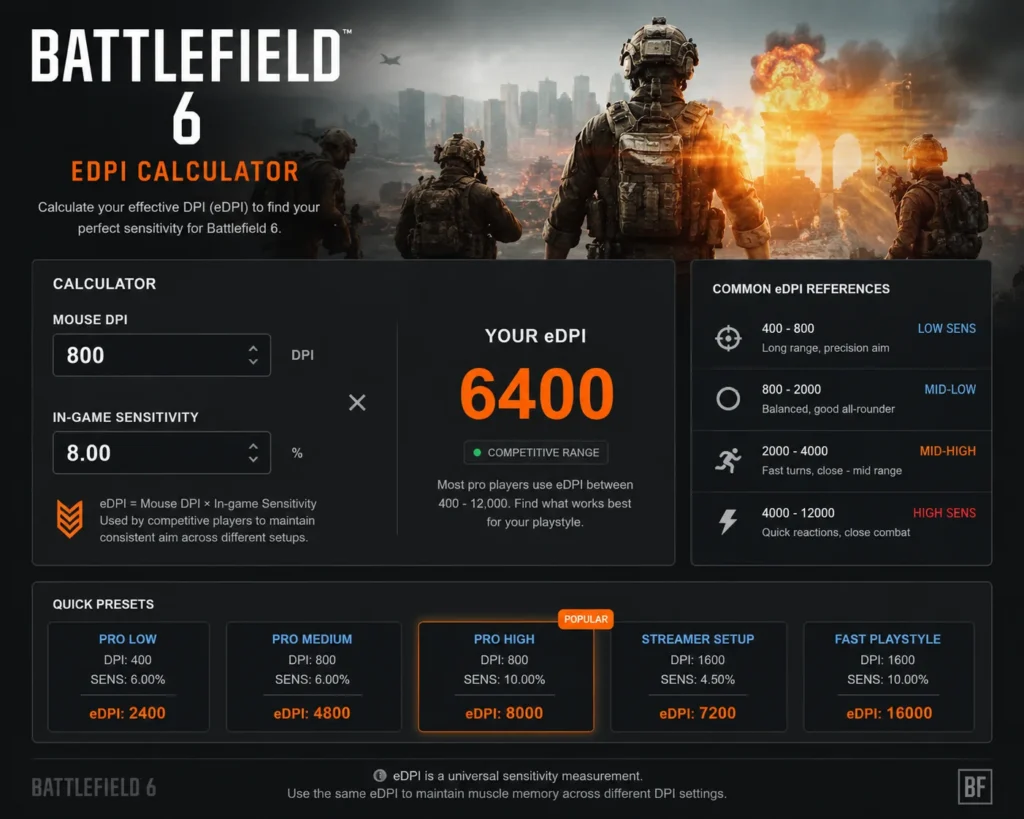
Battlefield 6 has large maps, close range fights, long range tracking, vehicles, recoil control, and many weapon types. Because of that, your mouse sensitivity needs to feel fast enough for movement but stable enough for precise shots. eDPI makes that easier to tune.
The basic formula is simple:
eDPI = Mouse DPI × Battlefield 6 Sensitivity
What Is eDPI in Battlefield 6?
eDPI means effective DPI. It combines your mouse DPI and Battlefield 6 sensitivity into one number.
Example:
- 400 DPI × 10 sensitivity = 4000 eDPI
- 800 DPI × 5 sensitivity = 4000 eDPI
- 1600 DPI × 2.5 sensitivity = 4000 eDPI
All three settings have the same eDPI. That means they should feel close in overall turn speed, even though the DPI and sensitivity numbers are different. for more game calculator check this Warzone eDPI Calculator
What Is a Battlefield 6 eDPI Calculator?
A Battlefield 6 eDPI calculator is a tool that multiplies your mouse DPI by your in game sensitivity. More complete calculators also show cm/360, ADS sensitivity, polling rate, and matching sensitivity for a new DPI.
A useful Battlefield 6 calculator should include:
- Mouse DPI
- Battlefield 6 infantry sensitivity
- ADS sensitivity
- Uniform Soldier Aiming setting
- Yaw value
- eDPI result
- cm/360 estimate
- inches/360 estimate
- matching sensitivity for 400, 800, 1600, or 3200 DPI
- polling rate note
Why eDPI Matters in Battlefield 6
Battlefield 6 aim is not only about headshots. You need a setup that works across many situations.
eDPI affects:
- close range target switching
- long range tracking
- recoil control
- sniping stability
- vehicle aim comfort
- hipfire movement
- ADS control
- turning speed during flanks
If your eDPI is too low, you may struggle to turn quickly. If your eDPI is too high, your aim may feel shaky at range.
Battlefield 6 eDPI Formula
The main formula is:
Battlefield 6 eDPI = Mouse DPI × In Game Sensitivity
Example calculation
- Mouse DPI: 800
- Battlefield 6 sensitivity: 10
800 × 10 = 8000 eDPI
Your Battlefield 6 eDPI is 8000.
Best eDPI Range for Battlefield 6
Different Battlefield 6 settings guides suggest slightly different ranges. A common practical range for many players is around 2400 to 4800 eDPI for controlled infantry aim, while faster players may use higher values for aggressive movement and close range weapons.
General Battlefield 6 eDPI ranges:
- Low control: 1600 to 3200 eDPI
- Balanced infantry aim: 3200 to 5000 eDPI
- Fast movement: 5000 to 8000 eDPI
- Very fast: above 8000 eDPI
These ranges are starting points. Your best setting depends on your mousepad size, FOV, monitor refresh rate, weapon choice, and aim style.
Best Battlefield 6 Sensitivity by DPI
400 DPI
- Low control: 4 to 8 sensitivity
- Balanced: 8 to 12 sensitivity
- Fast: 12 to 20 sensitivity
800 DPI
- Low control: 2 to 4 sensitivity
- Balanced: 4 to 8 sensitivity
- Fast: 8 to 12 sensitivity
1600 DPI
- Low control: 1 to 2 sensitivity
- Balanced: 2 to 4 sensitivity
- Fast: 4 to 8 sensitivity
3200 DPI
- Low control: 0.5 to 1 sensitivity
- Balanced: 1 to 2 sensitivity
- Fast: 2 to 4 sensitivity
If your sensitivity feels too jumpy, lower it slowly. Do not cut it in half after one bad match.
What Is cm/360 in Battlefield 6?
cm/360 means how many centimeters you move your mouse to turn 360 degrees in game. It is one of the best ways to compare sensitivity across different games.
Common cm/360 ranges:
- 15 to 20 cm/360: fast sensitivity for close range
- 25 to 35 cm/360: balanced sensitivity for most players
- 40 to 50 cm/360: slower sensitivity for precision and long range aim
Battlefield has many long range fights, so many players prefer a medium cm/360 instead of an extremely fast one.
eDPI vs cm/360
eDPI is useful when comparing Battlefield 6 settings. cm/360 is better when comparing Battlefield 6 to another game.
Use eDPI when:
- you are changing DPI inside Battlefield 6
- you want to keep the same aim feel
- you are comparing two Battlefield 6 setups
Use cm/360 when:
- you are converting from Valorant
- you are converting from CS2
- you are converting from Apex Legends
- you are matching another FPS game
Uniform Soldier Aiming in Battlefield 6
Uniform Soldier Aiming helps make ADS and hipfire feel more consistent across different zoom levels. Many Battlefield settings guides recommend turning it on if you want a more predictable aim feel.
Uniform Soldier Aiming can help with:
- scope consistency
- ADS tracking
- muscle memory
- switching between optics
- sniper and DMR control
If ADS feels strange, check Uniform Soldier Aiming, ADS sensitivity, zoom sensitivity smoothing, and coefficient settings before changing your base eDPI.
ADS Sensitivity in Battlefield 6
ADS sensitivity controls how fast your aim moves while aiming down sights. If your hipfire feels good but scopes feel wrong, your ADS settings may be the reason.
Good ADS starting points:
- 80 percent if scoped aim feels too fast
- 90 percent for a controlled balanced feel
- 100 percent if you want ADS close to hipfire feel
For long range weapons, slightly lower ADS sensitivity can make recoil and target correction easier.
Does Polling Rate Affect Sensitivity in Battlefield 6?
Polling rate does not directly change sensitivity. It does not change DPI, eDPI, or your Battlefield 6 sensitivity value.
Polling rate controls how often your mouse sends input to your PC.
Common polling rates:
- 125Hz reports every 8 milliseconds
- 250Hz reports every 4 milliseconds
- 500Hz reports every 2 milliseconds
- 1000Hz reports every 1 millisecond
- 2000Hz reports every 0.5 milliseconds
- 4000Hz reports every 0.25 milliseconds
- 8000Hz reports every 0.125 milliseconds
If you use 800 DPI and 5 sensitivity, your eDPI stays 4000 whether your mouse is set to 500Hz, 1000Hz, or 4000Hz.
Why Polling Rate Can Feel Like It Changes Sensitivity
Polling rate can change how your aim feels because it changes input timing. A higher polling rate can feel sharper and smoother. A lower polling rate can feel heavier or more delayed.
Polling rate can affect feel through:
- input delay
- mouse report timing
- frame time stability
- CPU load
- game input handling
- wireless receiver stability
- monitor refresh rate
The real sensitivity number does not change. The feel of the input can change.
500Hz vs 1000Hz for Battlefield 6
For most players, 1000Hz is the best default. It is fast, common, and stable on most modern gaming mice.
Use 1000Hz if:
- your PC runs Battlefield 6 smoothly
- you play infantry often
- you use a 144Hz or higher monitor
- your mouse supports stable 1000Hz
- you want lower mouse report delay
Use 500Hz if:
- 1000Hz causes stutter
- your PC is CPU limited
- your wireless battery drains too quickly
- your aim feels steadier at 500Hz
- you cannot feel a useful difference
Stable 500Hz is better than unstable 1000Hz.
Best Battlefield 6 Mouse Settings
Use these as a clean starting point:
- DPI: 800 or 1600
- Polling rate: 1000Hz
- Windows pointer speed: 6/11
- Enhance Pointer Precision: off
- Raw input: on if available
- ADS sensitivity: 80 to 100 percent
- Uniform Soldier Aiming: on if you want scope consistency
- FOV: choose a value you can track with comfortably
How to Find Your Best Battlefield 6 eDPI
Step by step method:
- Choose 800 DPI or 1600 DPI
- Pick a balanced sensitivity range
- Test infantry aim first
- Check ADS with 1x, 2x, 3x, and sniper scopes
- Lower sensitivity if you overshoot
- Raise sensitivity if turning feels slow
- Keep the same setting for several matches
- Adjust in small steps
Signs Your Sensitivity Is Too High
- You overshoot targets often
- Your scope shakes at long range
- Recoil control feels unstable
- You miss small aim corrections
- Tracking feels nervous
- Sniping feels too twitchy
Signs Your Sensitivity Is Too Low
- You cannot turn fast enough
- You run out of mousepad space
- Close range fights feel heavy
- You struggle to follow fast targets
- You need several swipes to clear angles
Common Battlefield 6 eDPI Mistakes
- Changing DPI and sensitivity at the same time
- Ignoring ADS sensitivity
- Ignoring Uniform Soldier Aiming
- Copying another player without checking cm/360
- Using high polling rate when it causes stutter
- Changing sensitivity after every bad match
- Leaving mouse acceleration on
- Testing only one weapon type
FAQs
What is a Battlefield 6 eDPI calculator?
It is a tool that multiplies your mouse DPI by your Battlefield 6 sensitivity to show your effective DPI.
How do I calculate Battlefield 6 eDPI?
Use this formula: mouse DPI × Battlefield 6 sensitivity = eDPI.
What is a good eDPI for Battlefield 6?
A balanced starting range is often around 3200 to 5000 eDPI. Lower values help precision, while higher values help faster turns.
What DPI should I use for Battlefield 6?
800 DPI or 1600 DPI is a strong starting point for most players.
Does polling rate affect sensitivity?
No. Polling rate does not directly change sensitivity or eDPI. It changes how often your mouse sends input.
Should I use 500Hz or 1000Hz?
Use 1000Hz if it is stable. Use 500Hz if 1000Hz causes stutter or inconsistent mouse feel.
Should I turn on Uniform Soldier Aiming?
Yes, if you want more consistent ADS feel across scopes. If ADS feels strange, test the coefficient and zoom smoothing settings.
Is cm/360 better than eDPI?
For cross game conversion, yes. For comparing Battlefield 6 settings, eDPI is still useful.
Why does ADS feel different from hipfire?
ADS uses zoom, FOV, scope sensitivity, and Uniform Soldier Aiming behavior. These settings can make scoped aim feel faster or slower than hipfire.
Should I copy pro settings?
You can use them as a starting point, but your best setting depends on mousepad size, aim style, DPI, FOV, and comfort.
Useful External References
For general game background, release details, developers, and official support links, visit the Battlefield 6 Wikipedia page. It is a helpful reference for readers who want basic information about the game before adjusting sensitivity settings.
or community discussions about Battlefield 6 sensitivity, mouse settings, ADS feel, and input issues, check the Battlefield 6 Reddit community. Player feedback can help when settings feel different after updates or when ADS sensitivity does not behave as expected.
Final Thoughts
A Battlefield 6 eDPI calculator is useful because it turns your DPI and sensitivity into one clear number. Once you know your eDPI, you can compare settings, change DPI safely, and tune your aim with less guesswork.
Polling rate does not directly affect sensitivity. Your eDPI stays the same at 500Hz, 1000Hz, or higher. But polling rate can change how your mouse feels because it changes input timing.
For most Battlefield 6 players, start with 800 or 1600 DPI, use 1000Hz polling rate, turn off mouse acceleration, keep raw input on, and tune your sensitivity until infantry aim, ADS control, and long range tracking all feel steady.