
Convert Blood Strike sensitivity, calculate eDPI, and check cm per 360 or inches per 360 for smoother FPS aim.
A Blood Strike Sensitivity Converter / Calculator helps you move your mouse sensitivity from another FPS game into Blood Strike without guessing. If you play games like Valorant, CS2, Apex Legends, Warzone, Fortnite, Overwatch 2, or Aim Lab, a converter can help you keep a similar aim feel across games.
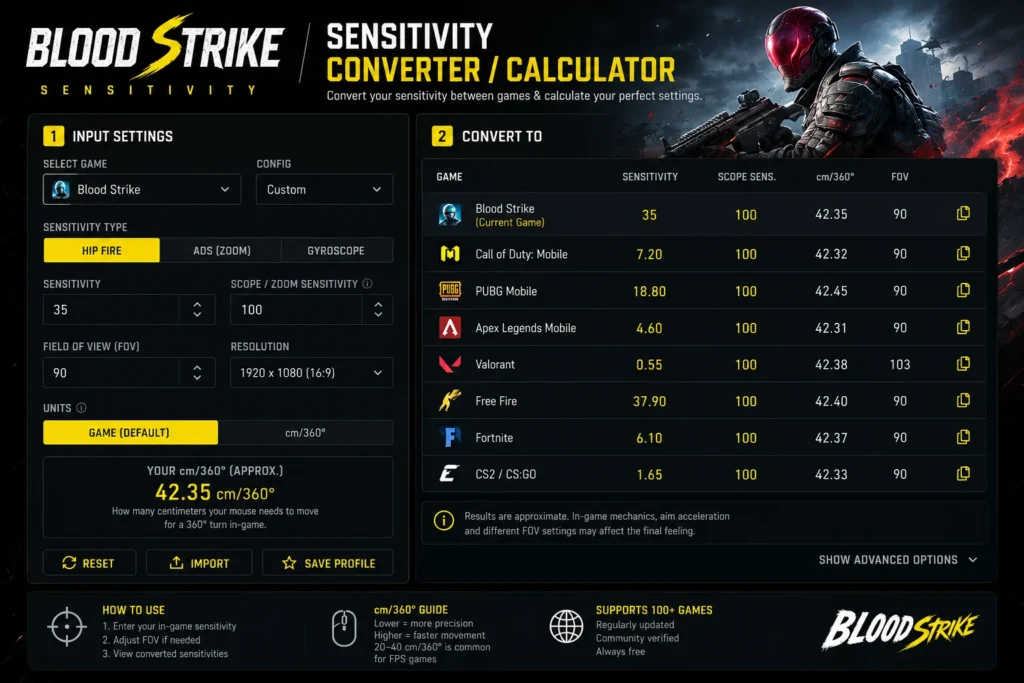
Blood Strike is fast, movement heavy, and built around quick fights. A small change in sensitivity can affect tracking, recoil control, close range turns, and long range aim. That is why many players use DPI, eDPI, cm per 360, and inches per 360 to find a better setting. checkout for more Overwatch 2 eDPI Calculator
What Is a Blood Strike Sensitivity Converter?
A Blood Strike sensitivity converter is a tool that changes your sensitivity from one game scale to another. Each FPS game handles mouse movement differently, so the same number does not always feel the same.
For example:
- 2.5 sensitivity in one game may feel slow.
- 2.5 sensitivity in another game may feel very fast.
- DPI changes can make the same sensitivity feel completely different.
- FOV and ADS settings can change how aiming feels on screen.
A converter uses game yaw values, DPI, and sensitivity to estimate a matching result.
Researched Data Used For Blood Strike Sensitivity
Based on current sensitivity converter data from XbitLabs, Blood Strike uses a yaw value of about:
- Blood Strike yaw: 0.00154
- Recommended eDPI range: 300 to 800
- Common DPI presets: 400, 800, 1600, 3200, 6400, 12800
Sensitivity converter sites such as Sens Converter and Trocador explain that yaw is the internal value that controls how many degrees your view turns per mouse count. This is why two games can feel different even when the sensitivity number looks the same.
Most tools also focus on hipfire or base sensitivity first. ADS sensitivity can vary because of weapons, scopes, zoom levels, and extra in game multipliers.
What Is eDPI In Blood Strike?
eDPI means effective DPI. It combines your mouse DPI and your in game sensitivity into one number.
Formula:
eDPI = DPI × sensitivity
Example:
- Mouse DPI: 800
- Blood Strike sensitivity: 0.75
- eDPI: 600
So:
800 × 0.75 = 600 eDPI
This number helps you compare settings more easily. Two players can use different DPI values but still have a similar eDPI.
Example:
- 400 DPI × 1.5 sensitivity = 600 eDPI
- 800 DPI × 0.75 sensitivity = 600 eDPI
- 1600 DPI × 0.375 sensitivity = 600 eDPI
All three setups give the same eDPI, although the mouse and menu feel may still differ slightly.
Why Use a Blood Strike Sensitivity Calculator?
A Blood Strike Sensitivity Calculator saves time and gives you a cleaner starting point. Instead of changing settings after every match, you can use real values and test from there.
It helps with:
- Converting sensitivity from other FPS games
- Calculating eDPI
- Checking cm per 360
- Checking inches per 360
- Matching your aim feel across games
- Building better muscle memory
- Reducing shaky aim
- Improving tracking
- Making recoil easier to control
- Finding a setting that fits your mousepad size
Use the Blood Strike Sensitivity Converter / Calculator
Convert your Blood Strike sensitivity, calculate eDPI, and compare cm per 360 or inches per 360 to find a smoother aim setting for FPS games.
What Is cm Per 360?
cm per 360 means how many centimeters your mouse must move to make one full turn in game.
Simple meaning:
- Lower cm per 360 means faster sensitivity.
- Higher cm per 360 means slower sensitivity.
- Fast sensitivity needs less mouse movement.
- Slow sensitivity needs more mouse movement.
This is one of the best ways to compare aim between games because it measures real mouse movement, not just the in game number.
Blood Strike Sensitivity Conversion Example
Here is a simple example using Blood Strike:
- Current game: Blood Strike
- DPI: 800
- Sensitivity: 0.75
- eDPI: 600
- Blood Strike yaw: 0.00154
If you change your DPI to 1600 and want to keep the same eDPI:
- Old eDPI: 600
- New DPI: 1600
- New sensitivity: 0.375
Formula:
600 ÷ 1600 = 0.375
This keeps the same effective sensitivity.
How To Use a Blood Strike Sensitivity Converter
Follow these steps:
- Select the game you are converting from.
- Enter your current sensitivity.
- Enter your current DPI.
- Select Blood Strike as the target game.
- Enter your target DPI.
- Copy the converted sensitivity.
- Open Blood Strike settings.
- Add the new sensitivity value.
- Test it in a match or training area.
- Adjust only a little if needed.
If you want to convert from Blood Strike to another game, choose Blood Strike as the source game and select your target game.
Best eDPI Range For Blood Strike
There is no perfect eDPI for every player. Your best setting depends on your mouse, hand control, role, screen size, mousepad, and playstyle.
A practical range:
- 300 to 500 eDPI: slower and more controlled aim.
- 500 to 800 eDPI: balanced aim for many players.
- 800 to 1200 eDPI: faster aim for close range fights.
- Above 1200 eDPI: very fast aim, harder to control for many players.
XbitLabs lists 300 to 800 as a recommended eDPI range for Blood Strike. This is a good starting area if you want smoother tracking and better control.
Low Sensitivity vs High Sensitivity In Blood Strike
Low sensitivity can help with:
- More stable aim
- Better long range control
- Cleaner recoil handling
- Smoother tracking
- Fewer accidental over flicks
High sensitivity can help with:
- Faster turns
- Better close range reactions
- Easier movement checks
- Quicker target switching
- Less mousepad space needed
Balanced sensitivity is usually the best starting choice. Blood Strike has fast fights, so you need speed, but the aim should still feel calm.
Blood Strike To Valorant Sensitivity
If you want to convert Blood Strike sensitivity to Valorant, use a calculator that supports yaw values. Since both games use different sensitivity systems, copying the same number will not give the same feel.
Check these values:
- Blood Strike sensitivity
- Blood Strike DPI
- Valorant target DPI
- cm per 360
- Converted Valorant sensitivity
After converting, test micro aim and target tracking. Valorant is slower and more precision based, so the same physical aim feel may still need small tuning.
Blood Strike To CS2 Sensitivity
CS2 players often care about cm per 360 because aim consistency matters a lot. If you convert Blood Strike to CS2, focus on matching physical mouse movement.
Check:
- Blood Strike cm per 360
- CS2 converted sensitivity
- DPI
- Raw input
- Mouse acceleration off
CS2 usually rewards controlled aim, so many players prefer a slower setup than they use in fast battle royale games.
Blood Strike To Aim Lab Sensitivity
Aim Lab is useful for warmups and aim practice. A Blood Strike sensitivity converter can help you train with a closer mouse feel.
For better practice, match:
- DPI
- Hipfire sensitivity
- cm per 360
- FOV if possible
- Mouse acceleration setting
Aim Lab may not feel exactly like Blood Strike, but matching cm per 360 makes practice more useful.
Common Mistakes When Converting Blood Strike Sensitivity
Avoid these mistakes:
- Using the same sensitivity number in every game
- Changing DPI after conversion
- Ignoring cm per 360
- Ignoring FOV differences
- Expecting ADS sensitivity to match perfectly
- Forgetting scope sensitivity
- Testing only during ranked matches
- Copying another player without checking your own comfort
- Changing settings after every bad fight
- Using mouse acceleration without realizing it
Tips To Find Your Best Blood Strike Sensitivity
Try this quick testing method:
- Start with a converted sensitivity.
- Track moving targets for a few minutes.
- Test close range turns.
- Test medium range spray control.
- Test long range tap shots.
- Try one lower value.
- Try one higher value.
- Pick the one that feels easiest to control.
- Keep it for several matches before changing again.
Small changes work better than big jumps.
Good adjustment examples:
- 0.75 to 0.72
- 0.75 to 0.78
- 0.50 to 0.48
- 0.50 to 0.52
Blood Strike Sensitivity Settings Checklist
Before you settle on a final value, check:
- Mouse DPI
- In game sensitivity
- ADS sensitivity
- Scope sensitivity
- FOV
- Mouse acceleration
- Windows pointer speed
- Raw input if available
- Polling rate
- Mousepad space
- Monitor refresh rate
Final Thoughts
A Blood Strike Sensitivity Converter / Calculator is useful for players who want better aim control and smoother movement between FPS games. It helps you calculate eDPI, convert sensitivity, check cm per 360, and understand how your mouse settings really work.
Use the calculator as a starting point, then test the result inside Blood Strike. The best sensitivity is the one that lets you track clearly, turn comfortably, control recoil, and stay steady in fast fights.
Research sources used: XbitLabs Blood Strike Sensitivity Converter, Sens Converter, Trocador Sensitivity Converter, Sensgod Mouse Sensitivity Converter.
External References
For basic game details, visit the Blood Strike Wikipedia page.
For player discussions about aim, settings, and updates, check the Blood Strike Reddit community.