
Calculate your Marvel Rivals eDPI, scoped eDPI, and matching sensitivity for a new DPI.
Marvel Rivals eDPI Calculator: Convert DPI, Sensitivity and Scoped Aim Settings
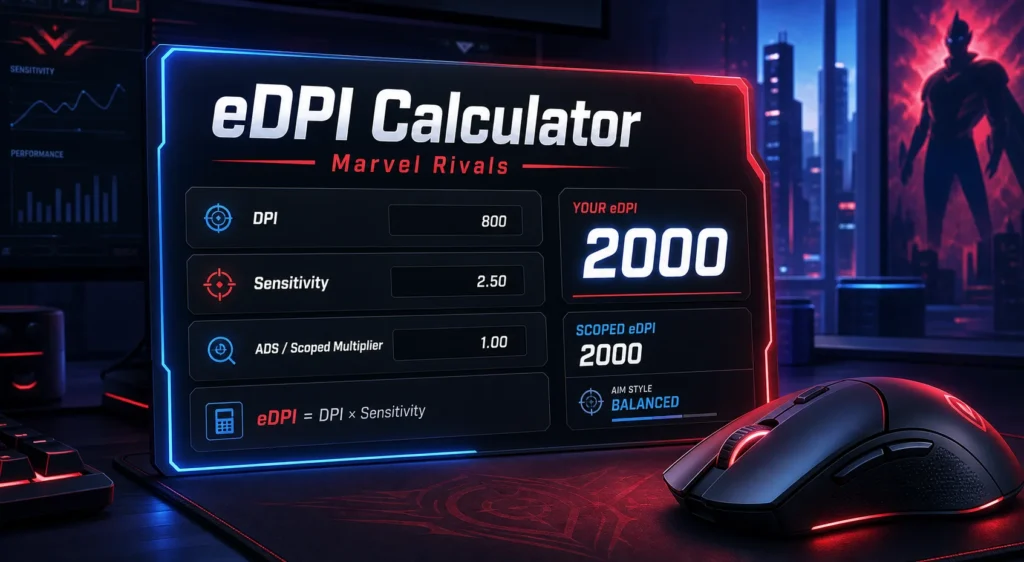
Your eDPI
2000
Balanced
Scoped eDPI: 2000
Sensitivity at New DPI: 1.250
Target Sensitivity: 2.500
Aim Style: Balanced Aim
Recommendation
Your eDPI is in a balanced range for Marvel Rivals. Keep this setting if tracking and turning both feel comfortable.
How eDPI Works
- eDPI equals mouse DPI multiplied by in game sensitivity.
- Use eDPI to compare sensitivity across different DPI settings.
- If you double your DPI, cut sensitivity in half to keep the same eDPI.
- Higher eDPI turns faster, while lower eDPI gives more control.
If your aim in Marvel Rivals feels too fast, too slow, or strangely inconsistent, your first stop should be your eDPI. eDPI, short for effective DPI, combines your mouse DPI and your in-game sensitivity into one number, making it much easier to compare settings.
The formula is simple:
eDPI = Mouse DPI x Marvel Rivals sensitivity
For example, if you play on 800 DPI and 1.5 in-game sensitivity, your Marvel Rivals eDPI is:
800 x 1.5 = 1200 eDPI
That number tells you more than DPI or sensitivity alone. A player using 400 DPI at 3.0 sensitivity and another player using 800 DPI at 1.5 sensitivity both have the same eDPI: 1200. Their mouse settings look different, but their effective sensitivity inside Marvel Rivals is the same.
Now for the big question: does polling rate affect sensitivity in Marvel Rivals?
The short answer is no, polling rate does not directly change your sensitivity or eDPI. Your sensitivity is still calculated from DPI and in-game sensitivity. But polling rate can change how your aim feels because it affects how often your mouse sends movement updates to your PC. check for more Mouse Input Latency Test.
What Is eDPI in Marvel Rivals?
eDPI is a way to measure your real mouse sensitivity in a game. DPI is your mouse hardware setting. In-game sensitivity is the multiplier set inside Marvel Rivals. eDPI puts both together.
If you only compare DPI, the comparison is incomplete. A player on 1600 DPI could still have slower aim than a player on 800 DPI if their in-game sensitivity is lower. That is why eDPI is more useful for comparing Marvel Rivals settings.
Use this formula:
DPI x Sensitivity = eDPI
Examples:
| Mouse DPI | Marvel Rivals Sensitivity | eDPI |
|---|---|---|
| 400 | 3.0 | 1200 |
| 800 | 1.5 | 1200 |
| 1600 | 0.75 | 1200 |
| 800 | 2.0 | 1600 |
| 1600 | 1.0 | 1600 |
This is why an eDPI calculator is useful. It helps you change DPI without accidentally changing how fast your aim moves in-game.
Marvel Rivals eDPI Calculator
To calculate your Marvel Rivals eDPI:
- Check your mouse DPI in your mouse software.
- Open Marvel Rivals and find your mouse sensitivity.
- Multiply DPI by sensitivity.
Example:
1000 DPI x 1.2 sensitivity = 1200 eDPI
If you want to keep the same eDPI but change your DPI, use this formula:
New sensitivity = Current eDPI / New DPI
Example:
You currently play at 800 DPI x 1.5 sens = 1200 eDPI.
If you switch to 1600 DPI, your new sensitivity should be:
1200 / 1600 = 0.75 sensitivity
That keeps your Marvel Rivals aim speed the same.
What Is a Good eDPI for Marvel Rivals?
There is no perfect eDPI for every Marvel Rivals player because hero choice, mousepad size, aiming style, and comfort all matter. A hitscan player who needs clean tracking may prefer lower sensitivity. A melee-focused or movement-heavy player may prefer a faster turn speed.
Current Marvel Rivals calculator pages commonly place the playable range around 1000 to 4000 eDPI, with examples often showing 800 DPI x 1.5 sensitivity = 1200 eDPI as a controlled setting. Treat that as a starting range, not a strict rule.
A practical way to choose:
| eDPI Range | Feel | Best For |
|---|---|---|
| Under 1000 | Very slow | Large mousepads, arm aiming, precise tracking |
| 1000-2000 | Controlled | Hitscan, steady tracking, accuracy-focused play |
| 2000-4000 | Medium-fast | Flexible hero pool, quick turns, mixed aim styles |
| Over 4000 | Very fast | Wrist aiming, small mousepads, movement-heavy play |
If your crosshair constantly overshoots targets, lower your eDPI. If you cannot turn fast enough during dives, flanks, or close-range fights, raise it slightly.
Does Polling Rate Affect Sensitivity?
Polling rate does not directly affect sensitivity.
Your Marvel Rivals eDPI is still:
DPI x in-game sensitivity
Polling rate is different. It measures how often your mouse reports movement to your computer.
Common polling rates:
| Polling Rate | Report Interval |
|---|---|
| 125Hz | 8 ms |
| 500Hz | 2 ms |
| 1000Hz | 1 ms |
| 2000Hz | 0.5 ms |
| 4000Hz | 0.25 ms |
| 8000Hz | 0.125 ms |
A higher polling rate can reduce mouse input delay and make movement feel smoother. But it does not change your DPI, your in-game sensitivity, or your eDPI number.
So if you change from 1000Hz to 4000Hz, your eDPI does not become faster or slower. What may change is the feel of your mouse movement. Some players describe higher polling as smoother or more responsive. Others notice no meaningful difference.
Why Polling Rate Can Feel Like It Changes Sensitivity
Even though polling rate does not mathematically change sensitivity, it can feel different for a few reasons.
First, higher polling sends more frequent movement updates. At 1000Hz, your mouse reports every 1 millisecond. At 4000Hz, it reports every 0.25 milliseconds. That can make motion feel more continuous, especially on a high-refresh-rate monitor.
Second, some games handle very high polling rates better than others. If a game, USB controller, mouse firmware, or CPU struggles with 4000Hz or 8000Hz, you may feel stutter, uneven aim, or inconsistent movement. That is not your eDPI changing. It is input delivery becoming less stable.
Third, high polling rates can use more CPU resources. On a strong modern PC, this may be fine. On an older or CPU-limited system, 4000Hz or 8000Hz can sometimes create performance issues that make aiming feel worse.
That is why many competitive players still use 1000Hz. It is fast, stable, widely supported, and usually enough for serious gaming.
Best Polling Rate for Marvel Rivals
For most Marvel Rivals players, 1000Hz is the safest recommendation.
Use this setup as a baseline:
- Mouse DPI: 800 or 1600
- Polling rate: 1000Hz
- Marvel Rivals eDPI: start around 1200-2400
- Raw input: enable it if available and stable on your setup
- Windows pointer speed: keep it at the default 6/11 if the game uses Windows input paths
- Mouse acceleration: turn it off for consistent aim
Try 2000Hz or 4000Hz only if:
- Your mouse supports it properly.
- Your PC can handle it without FPS drops.
- Your monitor is high refresh rate, such as 240Hz or higher.
- Marvel Rivals feels stable with it.
Avoid chasing 8000Hz unless you already know your setup benefits from it. For most players, the difference between 1000Hz and 8000Hz is much smaller than the difference between a comfortable eDPI and a bad one.
DPI vs eDPI vs Polling Rate
These three settings work together, but they do different jobs.
| Setting | What It Controls | Does It Affect Sensitivity? |
|---|---|---|
| DPI | Mouse sensor movement per inch | Yes |
| In-game sensitivity | Game multiplier | Yes |
| eDPI | DPI x sensitivity | Yes, this is your effective sensitivity |
| Polling rate | How often the mouse reports movement | No direct effect |
Think of DPI and sensitivity as the speed settings. Polling rate is the update frequency. It can affect smoothness and responsiveness, but it does not change the distance your crosshair moves for the same physical mouse movement.
Recommended Marvel Rivals Settings Workflow
If your aim feels off, do not start by changing everything at once. Use a simple process.
- Pick a DPI: 800 or 1600 is a good starting point.
- Set polling rate to 1000Hz.
- Choose a starting eDPI around 1200-2400.
- Test in practice range or quick matches.
- Lower eDPI if you overshoot.
- Raise eDPI if you cannot track fast movement or turn comfortably.
- Change only one setting at a time.
Give each change a real test. If you adjust sensitivity every few minutes, your aim never gets time to settle.
Common Mistakes
Mistake 1: Comparing DPI only
DPI alone does not tell you your Marvel Rivals sensitivity. Always compare eDPI.
Mistake 2: Using high polling rate to fix bad sensitivity
Polling rate cannot fix an eDPI that is too fast or too slow. Set your sensitivity first.
Mistake 3: Copying another player exactly
Pro or high-rank settings can be useful references, but your mousepad size, grip, desk space, hero pool, and comfort are different.
Mistake 4: Assuming 8000Hz is automatically better
Higher polling can reduce input delay on paper, but it can also add CPU load or cause compatibility issues. Stable aim matters more than the biggest number.
Mistake 5: Ignoring hero type
Marvel Rivals has very different hero styles. A precise aim hero may feel better at lower eDPI, while fast melee or movement heroes may feel better with a higher eDPI.
FAQ
What is eDPI in Marvel Rivals?
eDPI is your effective mouse sensitivity. It is calculated by multiplying your mouse DPI by your Marvel Rivals in-game sensitivity.
How do I calculate Marvel Rivals eDPI?
Use this formula: DPI x sensitivity = eDPI. For example, 800 DPI and 1.5 sensitivity equals 1200 eDPI.
Does polling rate affect Marvel Rivals sensitivity?
No. Polling rate does not directly change DPI, in-game sensitivity, or eDPI. It only changes how often your mouse reports movement to your PC.
Why does my sensitivity feel different after changing polling rate?
Higher polling rates can feel smoother or more responsive. Very high polling rates can also cause instability on some systems. The eDPI number stays the same, but the input feel can change.
What polling rate should I use for Marvel Rivals?
Most players should use 1000Hz. It offers a 1 ms report interval, strong compatibility, and stable performance. Try 2000Hz or 4000Hz only if your PC and mouse handle it well.
Is 4000Hz better than 1000Hz?
It can be slightly smoother on the right setup, but the difference is small for most players. If 4000Hz causes stutter, FPS drops, or inconsistent aim, use 1000Hz.
What is the best eDPI for Marvel Rivals?
A practical starting range is 1000-4000 eDPI, with many players likely feeling comfortable around 1200-2400 eDPI. Adjust based on your hero pool and aiming style.
Should I use 800 DPI or 1600 DPI?
Both are fine. The important part is your final eDPI. For example, 800 DPI at 1.5 sensitivity and 1600 DPI at 0.75 sensitivity both equal 1200 eDPI.
Final Verdict
For Marvel Rivals, your sensitivity is controlled by DPI and in-game sensitivity, not polling rate. Use an eDPI calculator to find your true sensitivity, then use polling rate as a smoothness and latency setting.
The best setup for most players is simple:
800 or 1600 DPI, 1000Hz polling rate, and an eDPI you can control consistently.
Once your eDPI feels natural, only then test higher polling rates. If 2000Hz or 4000Hz feels smoother and does not hurt performance, keep it. If it feels strange, unstable, or heavy on FPS, go back to 1000Hz. Stable aim wins more fights than chasing the highest hardware number.
Useful External References
To understand how eDPI works, it helps to learn what DPI means. The Dots Per Inch article on Wikipedia explains DPI as a measurement concept, which is useful because eDPI is calculated from mouse DPI and in game sensitivity.
For broader mouse input information, the Computer Mouse article on Wikipedia explains how mouse hardware, buttons, and movement tracking work.
For player discussions about settings, heroes, and gameplay, the Marvel Rivals Reddit community can be useful for seeing how real players talk about sensitivity, aim, and control.