
Calculate ARC Raiders eDPI, horizontal and vertical eDPI, cm/360 estimate, and matching sensitivity for a new DPI.
ARC Raiders eDPI Calculator: Convert Sensitivity and Improve Aim Control
Horizontal eDPI
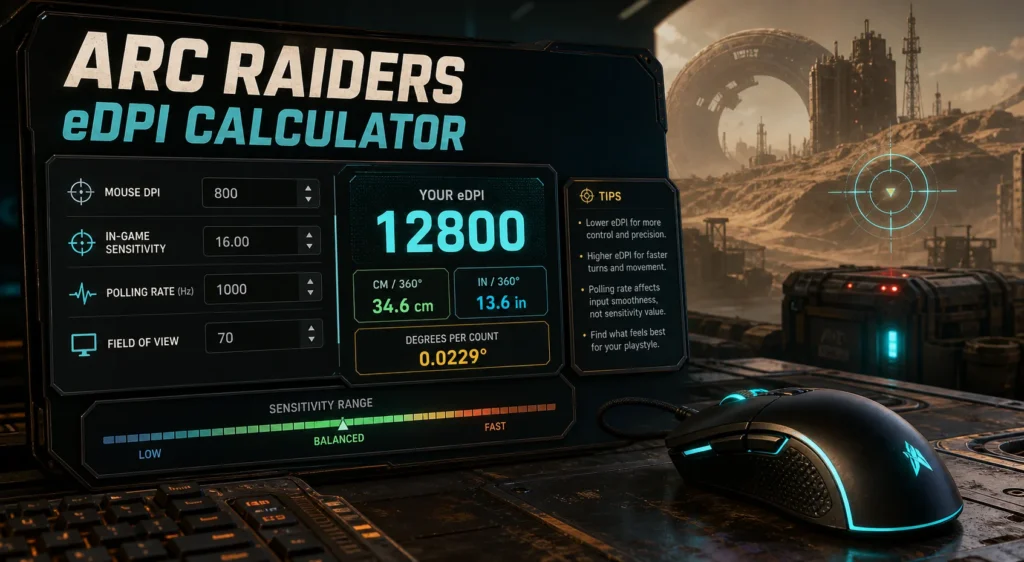
12800
Balanced
Vertical eDPI: 12800
cm/360 Estimate: 52.0 cm
inches/360: 20.5 in
Matching Sensitivity: 8.000 at 1600 DPI
Target Sensitivity: 16.000 for 12800 eDPI
Polling Interval: 1.00 ms
Degrees Per Count: 0.0880
Aim Style: Balanced Aim
Recommendation
Your eDPI is in a balanced range for ARC Raiders. Keep this setting if tracking and turning both feel comfortable.
How This Calculator Works
- eDPI equals mouse DPI multiplied by ARC Raiders sensitivity.
- Horizontal and vertical eDPI are shown separately.
- cm/360 is an estimate based on the yaw value entered.
- Polling rate does not change eDPI, but it can change how sensitivity feels.
An eDPI calculator for ARC Raiders helps you understand your real mouse sensitivity by combining your mouse DPI with your in game sensitivity. It gives you one clean number you can use to compare settings, convert sensitivity, and adjust your aim without guessing.
ARC Raiders is a fast extraction shooter with tracking, recoil control, looting pressure, close fights, and long range aim. Because the game has both horizontal and vertical sensitivity settings, FOV options, and mouse input behavior that some players report as inconsistent, a calculator can make your setup easier to tune.
One common question is simple: does polling rate affect sensitivity in ARC Raiders? In theory, polling rate does not change your eDPI. In practice, it can change how your sensitivity feels, especially if the game or your system handles high polling rates unevenly.
What Is eDPI in ARC Raiders?
eDPI means effective DPI. It combines your mouse DPI and your in game sensitivity into one number.
eDPI = Mouse DPI × ARC Raiders Sensitivity
Example:
- 400 DPI × 20 sensitivity = 8000 eDPI
- 800 DPI × 10 sensitivity = 8000 eDPI
- 1600 DPI × 5 sensitivity = 8000 eDPI
All three setups have the same eDPI. That means the overall sensitivity baseline should be similar, even though the DPI and in game sensitivity numbers are different. For More Mouse DPI Calculator
What Is an ARC Raiders eDPI Calculator?
An ARC Raiders eDPI calculator is a tool that takes your DPI and in game sensitivity, then shows your effective sensitivity. Some calculators also show cm/360, inches/360, FOV, sensitivity conversion, and target DPI matching.
A useful ARC Raiders calculator should include:
- Mouse DPI
- ARC Raiders horizontal sensitivity
- ARC Raiders vertical sensitivity
- FOV value
- eDPI result
- cm/360 estimate
- inches/360 estimate
- matching sensitivity for a new DPI
- low, balanced, or fast sensitivity rating
This is helpful because ARC Raiders sensitivity can feel different from games like Valorant, CS2, Apex Legends, Fortnite, Deadlock, and Marvel Rivals.
ARC Raiders Sensitivity Settings
Current ARC Raiders settings references show separate mouse sensitivity options for horizontal and vertical movement. The ARC Raiders Wiki lists mouse and keyboard sensitivity values with horizontal and vertical sensitivity ranges from 0 to 100, with 50 as a default style value.
Important sensitivity settings:
- Horizontal Sensitivity
- Vertical Sensitivity
- Mouse DPI
- Field of View
- Mouse smoothing or input behavior
- Polling rate
- Monitor refresh rate
- Frame time stability
Because horizontal and vertical sensitivity can be separate, you should check both values before blaming DPI or polling rate.
ARC Raiders eDPI Formula
The basic formula is:
ARC Raiders eDPI = Mouse DPI × ARC Raiders Sensitivity
Example calculation
- Mouse DPI: 800
- ARC Raiders sensitivity: 16
800 × 16 = 12,800 eDPI
Your ARC Raiders eDPI is 12,800.
Some ARC Raiders sensitivity tools use the main look sensitivity and DPI to compare settings inside ARC Raiders. Others use cm/360 to convert from ARC Raiders to games like Valorant, CS2, Apex, Warzone, and Overwatch.
Why ARC Raiders eDPI Looks Higher Than Other Games
ARC Raiders sensitivity numbers may look much higher than games like Valorant or CS2. That does not mean your aim is automatically faster. Different games use different sensitivity scales.
For example:
- Valorant sensitivity often looks like 0.2 to 0.6
- CS2 sensitivity often looks like 1.0 to 3.0
- ARC Raiders sensitivity may use much larger values
This is why eDPI is best for comparing ARC Raiders settings against other ARC Raiders settings, while cm/360 is better for comparing across different games.
What Is cm/360?
cm/360 means how many centimeters you move your mouse to rotate 360 degrees in game.
This is often better than eDPI when converting between games, because every game can use a different sensitivity scale.
cm/360 helps you compare:
- ARC Raiders to Valorant
- ARC Raiders to CS2
- ARC Raiders to Apex Legends
- ARC Raiders to Overwatch 2
- ARC Raiders to Fortnite
- ARC Raiders to Deadlock
If your cm/360 is the same in two games, your physical mouse distance for a full turn is closer, even if the sensitivity numbers look completely different.
Good eDPI Range for ARC Raiders
Because ARC Raiders sensitivity values are scaled differently from many FPS games, the eDPI number can be much larger. A calculator is most useful when comparing your own ARC Raiders setups.
General ARC Raiders eDPI ranges:
- Low control: under 8,000 eDPI
- Balanced: 8,000 to 20,000 eDPI
- Fast: 20,000 to 35,000 eDPI
- Very fast: above 35,000 eDPI
These are starting ranges, not strict rules. Your best setting depends on mousepad size, aim style, FOV, monitor refresh rate, and how stable the game feels on your system.
Best ARC Raiders Sensitivity by DPI
Use these as starting points, then adjust after real matches.
400 DPI
- Low control: 10 to 20 sensitivity
- Balanced: 20 to 40 sensitivity
- Fast: 40 to 60 sensitivity
800 DPI
- Low control: 5 to 10 sensitivity
- Balanced: 10 to 25 sensitivity
- Fast: 25 to 45 sensitivity
1600 DPI
- Low control: 2.5 to 5 sensitivity
- Balanced: 5 to 12.5 sensitivity
- Fast: 12.5 to 25 sensitivity
3200 DPI
- Low control: 1.25 to 2.5 sensitivity
- Balanced: 2.5 to 6.25 sensitivity
- Fast: 6.25 to 12.5 sensitivity
Does Polling Rate Affect Sensitivity?
Polling rate does not directly change sensitivity. It does not change DPI, eDPI, or your sensitivity slider value.
Polling rate means how often your mouse reports input to your PC.
Common polling rates:
- 125Hz reports every 8 milliseconds
- 250Hz reports every 4 milliseconds
- 500Hz reports every 2 milliseconds
- 1000Hz reports every 1 millisecond
- 2000Hz reports every 0.5 milliseconds
- 4000Hz reports every 0.25 milliseconds
- 8000Hz reports every 0.125 milliseconds
If you use 800 DPI and 16 sensitivity, your eDPI is still 12,800 whether your polling rate is 500Hz, 1000Hz, 4000Hz, or 8000Hz.
Why Polling Rate Can Feel Like It Changes Sensitivity
Although polling rate does not change the formula, it can change the feel of your aim. Higher polling rate sends updates more often, which can feel sharper or smoother. Lower polling rate can feel heavier or more delayed.
Polling rate can change feel because of:
- input timing
- frame time stability
- CPU load
- game engine input handling
- wireless receiver stability
- mouse firmware
- mouse smoothing behavior
- monitor refresh rate
Player discussions around ARC Raiders often mention sensitivity feeling different even when the settings number stays the same. Some players also report that polling rate changes the feel, especially at very high polling rates. Treat those reports as practical troubleshooting clues, not proof that polling rate changes eDPI mathematically.
500Hz vs 1000Hz for ARC Raiders
For most players, 1000Hz is a good default. It reports every 1 millisecond and is supported by most modern gaming mice.
Use 1000Hz if:
- Your PC runs ARC Raiders smoothly
- You use a modern gaming mouse
- You play on a high refresh monitor
- You want smoother tracking
- You do not notice stutter or input weirdness
Use 500Hz if:
- 1000Hz feels unstable
- Your PC is older
- Your mouse battery drains too quickly
- You notice inconsistent aim feel
- You want lower system load
Stable 500Hz is better than unstable 1000Hz.
Should You Use 250Hz in ARC Raiders?
Some ARC Raiders community discussions mention lowering polling rate to 250Hz as a possible workaround for mouse smoothing or inconsistent input feel. This is not a universal rule, but it may be worth testing if your mouse feels unusually floaty or changes speed between sessions.
Try 250Hz only if:
- 500Hz and 1000Hz both feel wrong
- Your sensitivity feels inconsistent after launch
- High polling rates cause stutter
- Your mouse movement feels floaty or smoothed
If 250Hz feels worse, go back to 500Hz or 1000Hz.
Does 4000Hz or 8000Hz Help in ARC Raiders?
Very high polling rates can feel excellent in some shooters, but ARC Raiders may not feel better for everyone at 4000Hz or 8000Hz. High polling creates more input events, which can raise CPU load and expose game input issues.
High polling may help if:
- Your CPU is strong
- Your FPS is stable
- Your mouse supports high polling cleanly
- Your monitor is 240Hz or higher
High polling may hurt if:
- Your aim feels slower or inconsistent
- The game stutters
- Your frame time graph spikes
- Your wireless receiver is too far away
- Your mouse software changes profiles automatically
If ARC Raiders feels strange at 4000Hz or 8000Hz, test 1000Hz, 500Hz, and 250Hz one by one.
Should You Change Sensitivity After Changing Polling Rate?
No, not immediately. If you change polling rate, keep the same DPI and sensitivity first. Then test the physical turn distance.
Clean testing method:
- Write down your DPI.
- Write down horizontal and vertical sensitivity.
- Set polling rate to 1000Hz.
- Measure a full 360 degree turn on your mousepad.
- Change polling rate to 500Hz.
- Repeat the same 360 degree turn test.
- Compare physical distance.
If the distance is the same, your sensitivity did not actually change. If the distance changes, check mouse acceleration, input smoothing, mouse profiles, or game bugs.
Polling Rate vs DPI in ARC Raiders
DPI and polling rate are different settings.
DPI controls movement amount
- Higher DPI sends more counts per inch
- Lower DPI sends fewer counts per inch
- DPI changes eDPI if sensitivity stays the same
Polling rate controls update timing
- Higher polling sends reports more often
- Lower polling sends reports less often
- Polling rate does not appear in the eDPI formula
For a clean setup, choose DPI first, set sensitivity second, then test polling rate last.
High DPI Low Sens vs Low DPI High Sens
Many players prefer higher DPI with lower in game sensitivity because it can feel smoother for small movement.
Same eDPI example:
- 400 DPI × 20 sensitivity = 8000 eDPI
- 800 DPI × 10 sensitivity = 8000 eDPI
- 1600 DPI × 5 sensitivity = 8000 eDPI
The overall eDPI is the same. But 800 DPI or 1600 DPI may feel smoother than 400 DPI because the mouse sends more movement counts per inch.
Best ARC Raiders Mouse Settings
These are safe starting points for most players.
- DPI: 800 or 1600
- Polling rate: 1000Hz first, 500Hz if unstable
- FOV: keep your normal preferred value
- Horizontal sensitivity: tune first
- Vertical sensitivity: match horizontal unless you prefer different vertical aim
- Mouse acceleration: off
- Windows pointer speed: default
- Monitor refresh rate: highest stable setting
How to Find Your Best ARC Raiders eDPI
Step by step method:
- Start with 800 DPI or 1600 DPI
- Choose a balanced sensitivity
- Keep vertical sensitivity equal to horizontal at first
- Test tracking moving targets
- Test close range turns
- Test long range recoil control
- Lower sensitivity if you overshoot
- Raise sensitivity if you cannot turn fast enough
- Change only one setting at a time
Signs Your ARC Raiders Sensitivity Is Too High
- You overshoot targets
- Your aim shakes during tracking
- You struggle with mid range recoil
- Small corrections feel too strong
- You lose control in close fights
- Your crosshair feels nervous
Signs Your ARC Raiders Sensitivity Is Too Low
- You cannot turn fast enough
- You run out of mousepad space
- Vertical aiming feels heavy
- You need multiple swipes in close fights
- You cannot track fast movement smoothly
FAQs
What is an ARC Raiders eDPI calculator?
An ARC Raiders eDPI calculator multiplies your mouse DPI by your in game sensitivity to show your effective DPI.
How do I calculate ARC Raiders eDPI?
Use this formula: Mouse DPI × ARC Raiders sensitivity = eDPI.
What is a good eDPI for ARC Raiders?
A balanced starting range is often around 8,000 to 20,000 eDPI, but the best value depends on your DPI, sensitivity scale, mousepad size, and aim style.
Does polling rate affect sensitivity in ARC Raiders?
Polling rate does not directly change eDPI, but it can change how sensitivity feels because it changes input timing.
Why does ARC Raiders sensitivity feel different sometimes?
Possible causes include polling rate behavior, frame time instability, mouse smoothing, game input handling, mouse profiles, or vertical and horizontal sensitivity differences.
Should I use 500Hz or 1000Hz in ARC Raiders?
Start with 1000Hz. If aim feels unstable, stuttery, or inconsistent, test 500Hz. Some players may also test 250Hz if they suspect smoothing issues.
Does 4000Hz or 8000Hz improve ARC Raiders aim?
It may help on strong systems, but it can also cause stutter or inconsistent feel. 1000Hz is the safer default for most players.
Should horizontal and vertical sensitivity match?
Start with matching values. Change vertical sensitivity only if aiming up and down feels clearly too slow or too fast.
Can I convert Valorant sensitivity to ARC Raiders?
Yes. Use a sensitivity converter that supports ARC Raiders and compare cm/360 instead of only eDPI.
Is eDPI enough for cross game conversion?
No. eDPI is best for same game comparison. For cross game conversion, cm/360 is usually more useful.
Useful External References
For setting ranges and game options, check the ARC Raiders Wiki settings page. It lists mouse and keyboard sensitivity settings, including horizontal and vertical sensitivity ranges.
For community discussion about sensitivity feel, polling rate, and input behavior, visit the ARC Raiders Reddit community. Player reports can help with troubleshooting, especially when aim feels inconsistent between sessions.
Final Thoughts
An eDPI calculator for ARC Raiders is useful because it gives you a clear sensitivity number instead of forcing you to guess. Once you know your eDPI, you can compare settings, change DPI safely, and tune your aim with more control.
Polling rate does not directly affect sensitivity. Your eDPI stays the same at 500Hz, 1000Hz, 4000Hz, or 8000Hz. But polling rate can affect how your aim feels because it changes mouse report timing and can interact with frame stability or game input behavior.
For most ARC Raiders players, start with 800 or 1600 DPI, use 1000Hz polling rate, match horizontal and vertical sensitivity at first, then test 500Hz or 250Hz only if the mouse feels floaty, slow, or inconsistent.