
Convert Battlefield 2042 sensitivity, calculate eDPI, and check cm per 360 or inches per 360 for smoother FPS aim.
Battlefield 2042 Sensitivity Calculator & Convertor helps you convert mouse sensitivity, calculate eDPI, DPI, cm per 360, and improve aim across FPS games.
Finding the right mouse sensitivity in Battlefield 2042 can change the way the game feels. One small setting can affect your aim, tracking, recoil control, vehicle handling, and long range shots. That is why a Battlefield 2042 Sensitivity Calculator & Convertor is useful for players who switch between games like Valorant, CS2, Apex Legends, Warzone, Battlefield V, and Aim Lab.check This Battlefield 6 eDPI Calculator: Best DPI, Sensitivity and ADS Settings.
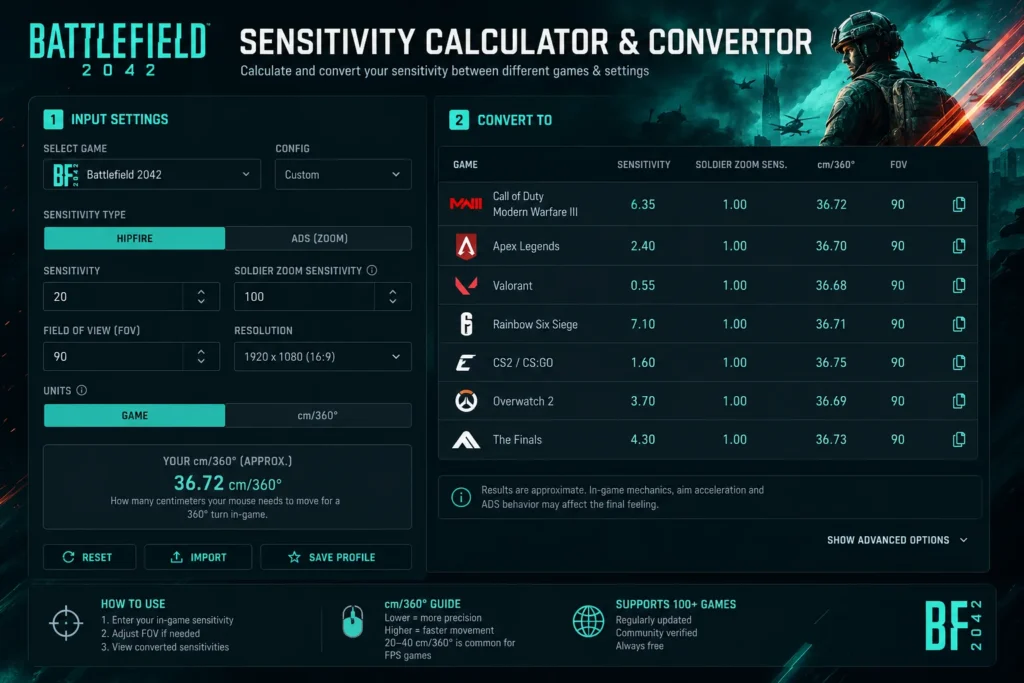
Instead of guessing your new sensitivity, a calculator helps you keep the same aim feel by using values such as DPI, in game sensitivity, eDPI, cm per 360, and inches per 360.
What Is a Battlefield 2042 Sensitivity Calculator & Convertor?
A Battlefield 2042 sensitivity calculator is a tool that converts your current mouse sensitivity from one game to Battlefield 2042, or from Battlefield 2042 to another FPS game.
It helps you keep your muscle memory steady when moving between games.
You can convert:
- Valorant to Battlefield 2042
- CS2 to Battlefield 2042
- Apex Legends to Battlefield 2042
- Battlefield V to Battlefield 2042
- Battlefield 2042 to Warzone
- Battlefield 2042 to Aim Lab
The goal is simple. You want your mouse movement to feel familiar, even when the game engine and sensitivity scale are different.
Why Sensitivity Matters In Battlefield 2042
Battlefield 2042 is not only about close range gunfights. You deal with huge maps, moving vehicles, long sightlines, fast specialists, helicopters, tanks, and sudden flanks.
A good sensitivity helps with:
- Cleaner tracking on moving targets
- Better recoil control
- Smoother flicks
- More stable sniper aim
- Faster target switching
- Less over aiming
- Better comfort during long sessions
If your sensitivity is too high, your aim may feel shaky. If it is too low, turning around in close fights can feel slow. The best setting is the one that gives you control without making your hand work too hard.
Key Terms You Should Know
Before using a Battlefield 2042 Sensitivity Calculator & Convertor, it helps to understand the main terms.
- DPI means how sensitive your mouse is outside and inside games.
- In game sensitivity is the value you set inside Battlefield 2042.
- eDPI means DPI multiplied by in game sensitivity.
- cm per 360 means how far your mouse moves to turn once in game.
- Inches per 360 is the same measurement in inches.
- Hipfire sensitivity means your normal aim before aiming down sights.
- ADS sensitivity means your aim while scoped or zoomed.
Many converters focus on hipfire sensitivity first, because ADS settings can change based on zoom level, field of view, and game specific settings.
Battlefield 2042 Sensitivity Settings To Check
In Battlefield 2042, mouse sensitivity is not only one slider. EA lists several mouse and aim settings for PC players.
Important settings include:
- Soldier Mouse Aim Sensitivity
- Soldier Zoom Aim Sensitivity
- Vertical Mouse Aim Ratio
- Vertical Mouse Zoom Ratio
- Uniform Soldier Aiming
- Coefficient
- Field of View
- ADS Field of View
- Vehicle Mouse Aim Sensitivity
- Tank Aim Sensitivity
- Gunner Sensitivity
- Aircraft Control Sensitivity
According to EA, Soldier Mouse Aim Sensitivity ranges from 0 to 100, with a default value of 20. Field of View ranges from 0 to 105, with a default value of 55. Uniform Soldier Aiming also has a coefficient setting, with EA listing 133 as the default.
These settings matter because a calculator can give you a strong starting point, but your final feel may change depending on FOV, zoom settings, and whether Uniform Soldier Aiming is on.
How To Use a Battlefield 2042 Sensitivity Calculator
Using a converter is simple.
- Select your current game.
- Enter your current sensitivity.
- Enter your mouse DPI.
- Select Battlefield 2042 as the target game.
- Enter your target DPI if it is different.
- Copy the converted sensitivity.
- Test it in a match or practice range.
- Adjust slightly if needed.
If you are converting from Battlefield 2042 to another game, do the reverse.
- Choose Battlefield 2042 as the source game.
- Add your Battlefield 2042 sensitivity.
- Add your DPI.
- Pick the target game.
- Use the new converted value.
For the cleanest result, keep your DPI the same across games. If you change DPI, the calculator needs both old and new DPI values.
Best Sensitivity Range For Battlefield 2042
There is no single perfect sensitivity for every player. Still, many FPS players prefer a range that gives enough room for tracking and enough speed for fast turns.
A practical starting range:
- Low sensitivity gives better precision and long range aim.
- Medium sensitivity gives a balanced feel for infantry fights and vehicles.
- High sensitivity gives faster turns, but recoil control can become harder.
Many sensitivity tools show cm per 360 because it is easier to compare across games. Sensgod notes that many pro players in tactical shooters use around 20 to 60 cm per 360. Battlefield 2042 is more chaotic than a tactical shooter, so some players may prefer the lower end for faster movement, while others may stay higher for smoother aim.
Good starting points:
- 20 to 30 cm per 360 for fast close range play
- 30 to 45 cm per 360 for balanced infantry aim
- 45 to 60 cm per 360 for slower, steadier aim
- Above 60 cm per 360 for very low sensitivity players
Common Mistakes When Converting Sensitivity
Avoid these mistakes when using a Battlefield 2042 Sensitivity Calculator & Convertor.
- Changing DPI after converting
- Ignoring Field of View differences
- Expecting ADS sensitivity to match perfectly
- Forgetting vehicle sensitivity settings
- Copying another player without testing
- Using Windows mouse acceleration
- Making big changes after one bad match
- Testing only in live chaos instead of a controlled area
A calculator gives you a smart starting point. Your hand, mousepad size, role, weapon choice, and monitor setup still matter.
Tips For Better Aim After Conversion
Once you get your converted sensitivity, do not judge it after one fight. Give it a short testing routine.
Try this:
- Spend 5 minutes tracking moving targets.
- Test hipfire and ADS separately.
- Try one assault rifle, one SMG, and one sniper.
- Check close range turning speed.
- Check long range micro aim.
- Test vehicle aim if you often drive or gun.
- Keep the setting for at least a few matches.
- Make tiny changes, not huge jumps.
Small changes are easier to learn. If your aim feels almost right, adjust by 2 to 5 percent instead of rebuilding the whole setup.
Battlefield 2042 To Aim Lab Conversion
Many players use Aim Lab to train Battlefield 2042 aim. A sensitivity converter helps you match your Battlefield 2042 feel inside Aim Lab.
This is useful for:
- Tracking practice
- Flick drills
- Recoil control warmups
- Target switching
- Long range precision
For best results, match:
- DPI
- Sensitivity
- Field of View as closely as possible
- Hipfire feel
- cm per 360
If Aim Lab feels close but not exact, use cm per 360 as your main guide.
Final Thoughts
A Battlefield 2042 Sensitivity Calculator & Convertor saves time and removes guesswork. It helps you move between FPS games without losing your aim feel. Use it to get your starting value, then test it with your own mouse, DPI, FOV, weapons, and playstyle.
The best sensitivity is not the one used by a pro or copied from a forum. It is the one that lets you track smoothly, turn comfortably, and stay in control during the wild fights Battlefield 2042 is known for.
Sources used for research:
For general game details, visit the Battlefield 2042 Wikipedia page.
To see player discussions about settings and gameplay, check the Battlefield 2042 Reddit community.